

All docs
Uninstalling AI Boost
From AI Boost 1.1.0, an uninstall keeps what you wrote. Your settings, your licence key, your redirect rules and Multilang's translations stay in your Joomla database, and a reinstall on the same site finds them as you left them. Only the 404 log, the error log and the results of the scan on Pages go, the three things AI Boost recorded by itself, and AI Boost's own section of robots.txt. What your editors typed into AI Boost's fields on articles, categories and user profiles stays too, hidden.
Plan & Updates says the same in its last section, the one about uninstalling. It links to this page, and its Open Joomla's extension manager button takes you to the screen where you remove the package.
Version 1.0.x worked differently. Its uninstall took the settings, the licence key and the redirect rules as well, and the section If your site runs 1.0.x below says what to do about it.
Before you uninstall
- Take a full site backup, database included, as you would before removing any extension.
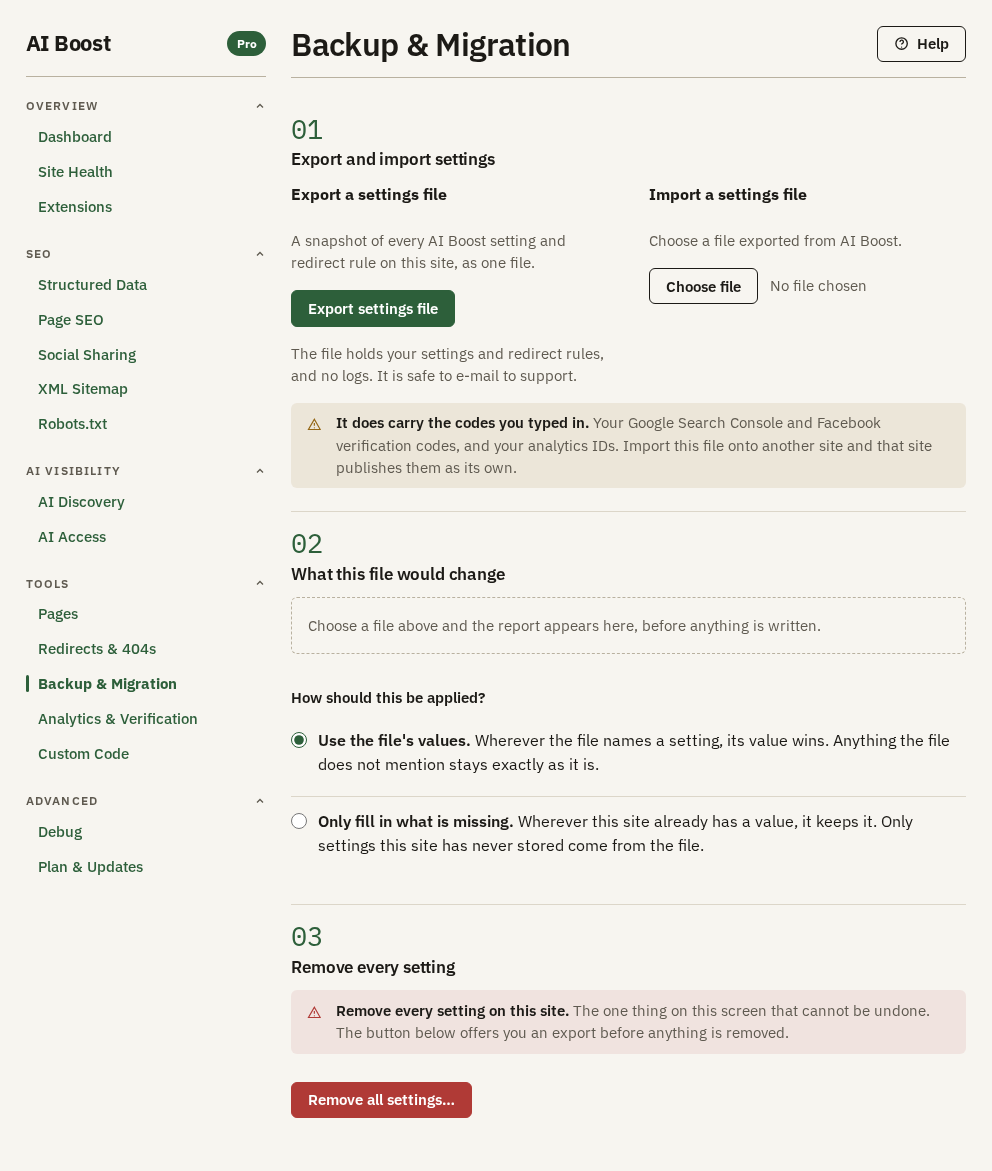
- Export your settings if they are going somewhere else. On the same site the uninstall keeps them, so the file is for moving to another site, or for a copy that does not depend on the database. On Backup & Migration, under Export and import settings, Export settings file writes every setting, every redirect rule and Multilang's translations into one file. It carries no log, no scan result and no licence key. It does carry what you typed into the settings, your verification codes, analytics IDs, VAT number, IndexNow key and Custom Code among them, so keep it where you keep other private files.
- Your licence key stays. It is stored with the settings, so a reinstall on the same site finds the site still activated. The settings file does not carry it. On another site you activate it with the key from your account, where the link in your purchase email also leads.
- Know what happens to robots.txt. The uninstall takes out AI Boost's section, the lines from
# BEGIN AI Boost for Joomlato# END AI Boost for Joomla, and keeps every line you wrote. If your host does not let Joomla write the file, the section stays and Joomla's uninstall screen says so. Then delete those lines by hand. - Plan for the sitemap. If you submitted
/sitemap.xmlto Google Search Console, that address stops answering. Put another sitemap in place, or remove it from Search Console, so the report does not fill with errors.
To remove the settings as well, press Remove all settings… on Backup & Migration before you uninstall. Removing everything on purpose below says what it takes and what it leaves.
What is kept and what goes
| What | After uninstalling |
|---|---|
| Every setting you configured, and the last Site Health result | Kept |
| Redirect rules, and how often each was used | Kept |
| Multilang's translations | Kept, whether Multilang was switched on or not |
| The record of past imports on Backup & Migration, from 1.1.1 | Kept |
| The licence key stored on this site | Kept. A reinstall finds the site still activated |
| The 404 log and the error log | Gone |
| The results of the last scan on Pages | Gone |
| Values typed into AI Boost's fields on articles and categories | Kept, hidden |
| Values typed into AI Boost's fields on user profiles | Kept, hidden |
| The Indexed answer you gave each page on Pages | Kept, in Joomla's own robots setting for that page |
| AI Boost's section in your robots.txt | Gone. The lines you wrote stay |
Everything AI Boost wrote into your pages stops the moment it is removed, the structured data, the sitemap, the sharing tags, the canonical links, llms.txt and the analytics tags.
Removing AI Boost does not tell our licence server. The site keeps its place in your plan, and a reinstall on the same domain takes that place again, so it costs you no extra site. If you move AI Boost to a different domain and your plan has no site left, contact support and ask us to free the old one.
The fields on your editing forms
AI Boost adds its own fields to the article editor, to categories and to user profiles, such as a sharing title for one article or an author's job title. On uninstall those fields are hidden, not deleted. AI Boost switches them, and the tab they sit on, to unpublished, so your editors see a clean form with nothing left over from an extension that is gone.
Everything anyone typed into them stays exactly where it is. Fields you created yourself are never touched, whatever state they are in.
Removing it
Go to System, then Manage, then Extensions, search for AI Boost, tick AI Boost for Joomla, the package, and press Uninstall. Removing the package removes its parts with it, Multilang and YOOtheme included, since both live inside the package. Joomla will not remove the component or the plugin on their own while the package is installed.
If you reinstall
- Install the package again. Your settings and the rest of what the uninstall kept are back as you left them, because their tables never left. The 404 log, the error log and the scan results on Pages start empty.
- The hidden fields stay hidden until you bring them back. Four buttons do it, for three kinds of form, since two of them serve articles. Each switches back on the AI Boost fields a previous uninstall hid there, and touches nothing your editors typed. On Social Sharing, Create or repair the article sharing fields covers articles, and Create or repair the category sharing fields covers categories. On Structured Data, sub-tab Content Types, Create or repair the article fields covers articles too. Create or repair the author fields on the same sub-tab covers user profiles, once Enable Author Schema is on. The two buttons on Social Sharing and the author button work only on a site that has been activated, and a reinstalled site still is. To bring every field back, press one of the article buttons, the category button, and the author button if you publish author details.
Moving to another site
- Install the package on the new site.
- On Plan & Updates, enter your licence key and press Activate this site. Do this before the import, because a site that has not been activated leaves every setting that works only on an activated site as it is.
- On Backup & Migration, press Choose file under Import a settings file and pick your exported file. AI Boost shows what the file would change under What this file would change before anything is written. Leave Use the file's values chosen and press Import these settings. What the file carries comes across, and step 2 of Before you uninstall lists it.
Removing everything on purpose
From 1.1.0, an uninstall keeps what you wrote, so that a reinstall loses nothing. To remove it as well, take two steps.
- Before you uninstall, open Backup & Migration and press Remove all settings…. It removes every setting, Multilang's translations and, from 1.1.1, the record of past imports, and keeps the licence key, the redirect rules, the logs and the fields. The window offers Export settings file first, and nothing brings the settings back without that file. Remove every setting on the Backup & Migration page walks through it. The Danger zone on Plan & Updates points to the same button.
- After you uninstall, drop the tables that stay, which takes the licence key and the redirect rules with them. Replace
jos_with your table prefix. The last table exists from 1.1.1, and on 1.1.0 its statement does nothing.
DROP TABLE IF EXISTS jos_aiboost_settings;
DROP TABLE IF EXISTS jos_aiboost_redirects;
DROP TABLE IF EXISTS jos_aiboost_multilang_text;
DROP TABLE IF EXISTS jos_aiboost_import_records;
If you want the fields gone too
An uninstall leaves AI Boost's fields and their values on your site, and dropping the tables does not touch them. It also leaves the Indexed answer you gave a page on Pages, which sits in that page's own robots setting in Joomla, and a few files in Joomla's cache folder.
You may want the fields gone as well, for example before you hand the site to someone else. Deleting a field deletes what was typed into it, and there is no undo, so take a backup first. Then, after uninstalling:
- Under Content, Fields, delete AI Boost's fields once with Context set to Articles and once with it set to Category.
- Under Users, Fields, delete AI Boost's fields.
- Under Content, Field Groups, delete AI Boost's groups, again once for Articles and once for Category.
- Under Users, Field Groups, delete AI Boost's groups.
If your site runs 1.0.x
An uninstall of 1.0.x dropped all five of AI Boost's tables, the settings with the licence key in them, the redirect rules, the 404 log, the error log and the results of the scan on Pages. A reinstall of 1.0.x started from nothing unless you had exported a settings file first, and you entered your licence key again. Multilang did not exist yet. The fields on your editing forms were hidden and kept, as in 1.1.0.
If your site still runs 1.0.x, update it to 1.1.0 before you uninstall, and the uninstall keeps your settings as this page describes.
Still stuck?
If something did not come back as this page describes, do not start deleting things. Contact support with your Joomla version and what you see, and we will help you get it back.