

All docs
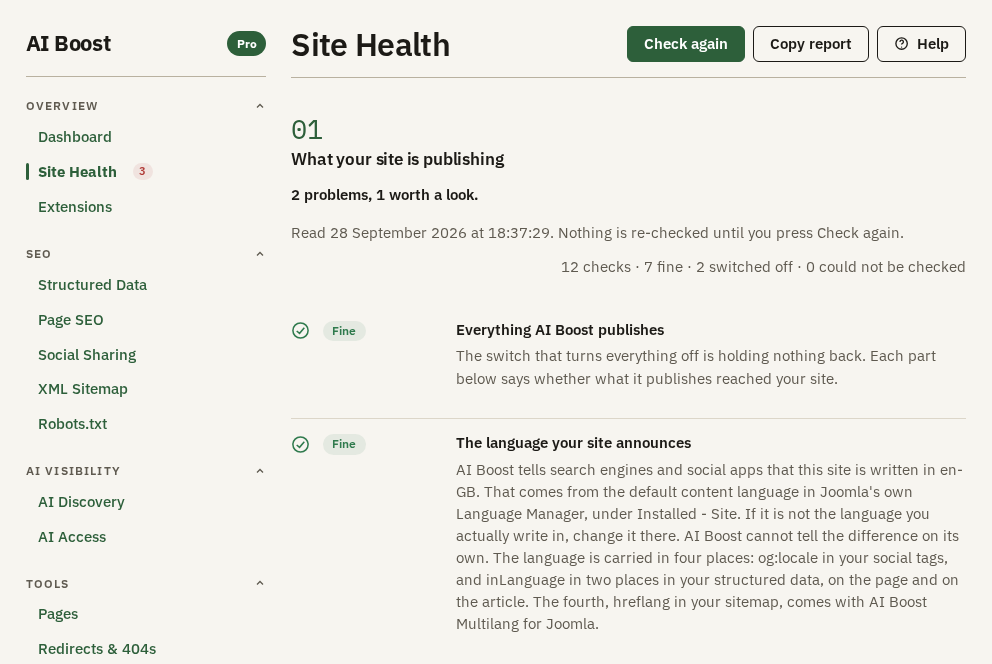
Site Health
A settings screen tells you what you asked for. It cannot tell you what your visitors receive. A caching extension can strip a tag after AI Boost writes it, another extension can serve its own sitemap at the same address, and your host can send a header that asks search engines to leave every page out. None of that shows on a settings screen.
Site Health reads your site from the outside. Your server fetches your own pages and files the way a visitor or a crawler would, and each row reports what came back. When a row and a settings screen disagree, the row describes your live site.
It is the second entry under Overview in AI Boost's sidebar. It has one numbered section, What your site is publishing, with a row for each of eight parts of AI Boost and four rows of its own. Check again and Copy report sit at the top right.
The examples on this page come from a test site set up as a 24-room London hotel, the Aldwick Lane Hotel. The rows in the screenshots are that site's, faults included.
Running the check
Each check fetches four addresses on your site, the home page, /robots.txt, /sitemap.xml and /llms.txt. Depending on what you switched on and what those four addresses return, it also fetches:
- the picture your home page names for sharing, when Open Graph is on,
- one article, when plain-text copies are on, to look for the link to its copy,
- the news sitemap, when the Google News sitemap is on,
- up to five addresses taken from across your sitemap, to see that they answer,
- every file your sitemap index lists, when AI Boost splits a large sitemap.
It waits up to six seconds for each one, and a whole check usually takes a few seconds.
Opening Site Health runs a check, unless one has run since you opened AI Boost and neither switch under Publishing has changed since. After that, the rows stay as they are until you press Check again here or Re-run now on the Dashboard. The line under the bold count says when the rows were read, such as "Read 28 September 2026 at 18:37:29". Old rows describe your site as it was then, so press Check again after you change something.
The top of the screen
The bold line counts the rows that need you, such as "2 problems, 1 worth a look." With none, it reads "Everything is fine."
The line on the right counts every row:
12 checks · 7 fine · 2 switched off · 0 could not be checkedThe switched off count takes in both the Switched off and the Nothing to check rows. The could not be checked count stands apart from the problems. AI Boost could not look, and that says nothing about whether the part works.
After a check, Site Health in the sidebar carries a small number, the Problem and Worth a look rows added together. On the test site it reads 3.
The word on each row
Every row carries one of six words.
| Word | What it means |
|---|---|
| Fine | What the part publishes was found on your live site |
| Worth a look | What was found is valid, but it may not be what you meant |
| Problem | AI Boost looked, and what the part publishes was missing or broken |
| Switched off | You switched the part off, so there is nothing to look for |
| Nothing to check | The part is not switched off itself, but there is nothing to look for. Custom Code with no code saved is one case. While Publish nothing at all is on, every part row reads this, including the parts you switched off |
| Could not check | The fetch failed, so the row makes no guess either way |
A part can hold several checks. Its row shows the most serious finding among them, Problem first, then Worth a look, then Could not check.
Beside the word, a row has up to three more things. The sentence reports what arrived. Most rows then say who wrote it:
- "AI Boost writes this, and nothing else on your page does."
- "AI Boost writes this, and something else on your site writes it too." A row that would be Fine becomes Worth a look, and the grey box quotes the other version.
- "AI Boost serves this file." The sitemap or
llms.txtcarries AI Boost's own mark.
When a sitemap at /sitemap.xml or a file at /llms.txt does not carry AI Boost's mark, the row's sentence reads "Another extension serves this file." and the row reads Worth a look. A Problem found by another check on the same part still comes first.
The grey box quotes the exact text the row read from your page or file, so you can judge it yourself. A row never names the other extension. Where it can, the grey box shows what that extension wrote.
The two rows about the whole site
Everything AI Boost publishes speaks for Publish nothing at all, the switch on the Dashboard under Publishing. It is Fine when that switch holds nothing back. It is Worth a look when the switch is on, and when no part of AI Boost is switched on at all.
The language your site announces reports the default content language Joomla holds, en-GB on the test site. AI Boost repeats it in the og:locale sharing tag and in the structured data. It has no way to tell whether that is the language you write in, so the row is Fine whenever it can read the language. Read the tag yourself, and if it is wrong, change the default in Joomla's own Language Manager.
One row per part
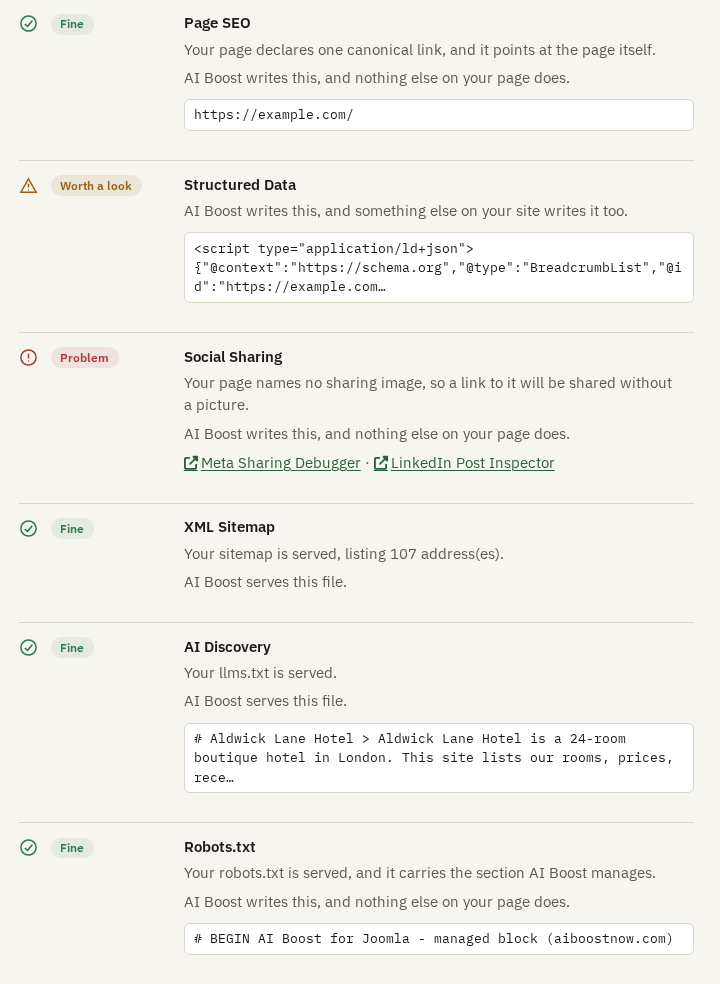
Each of the next eight rows carries the name of the screen it checks. Fix what a row reports on that screen, then press Check again.
Page SEO reads the canonical link on your home page, once Enable canonical URL management is on. One link that points at the page itself is Fine. None, or more than one, is a Problem. A link to another address is Worth a look, because that is sometimes deliberate. This row does not read titles or descriptions. Pages, Check addresses, Google shows those.
Structured Data reads the structured data AI Boost wrote into your home page. It is a Problem when the block is not valid, when AI Boost wrote none, and when the type you chose under Schema Type is missing from it. When AI Boost wrote none, the usual reason is an empty Organisation Name. It is Worth a look when another extension's structured data on the same page is broken, or when something else publishes structured data too. On the test site the grey box quotes a breadcrumb list that something else wrote into the home page. Decide which extension should publish structured data about your pages, and switch off the other one's version.
Social Sharing counts AI Boost's Open Graph and X tags in the page, checks that the page names a sharing picture, and asks for that picture. It is a Problem when none of the tags arrived, when no picture is named, and when the picture does not load. On the test site no Default OG Image is set and the home page has no picture of its own, so a link to it would be shared with no picture. Set one on Social Sharing, then press Check again. Meta Sharing Debugger and LinkedIn Post Inspector open those tools with your home page's address already filled in.
XML Sitemap reads /sitemap.xml and counts its addresses, across every file when the sitemap is split. It is Fine when the sitemap is served and none of the faults below turns up. It is a Problem when there is no sitemap, when the address answers with something that is not a sitemap, when the sitemap lists no addresses, when it lists raw Joomla addresses that start index.php?option=com_, when a file the sitemap index lists is missing, and when any of the addresses it tried do not answer.
AI Discovery reads /llms.txt, and with plain-text copies on, it looks in one article for the link to that article's copy. It reads the link, not the copy. It is a Problem when llms.txt is missing or empty, and when the article carries no link.
Robots.txt reads /robots.txt. It is Fine when the file carries AI Boost's section and the crawler rules in it match your answers. It is a Problem when there is no file, when AI Boost's section is missing, and when a rule in the file differs from what you chose. With Write usage signals into robots.txt on and an answer set, it also checks that the usage signal line is there.
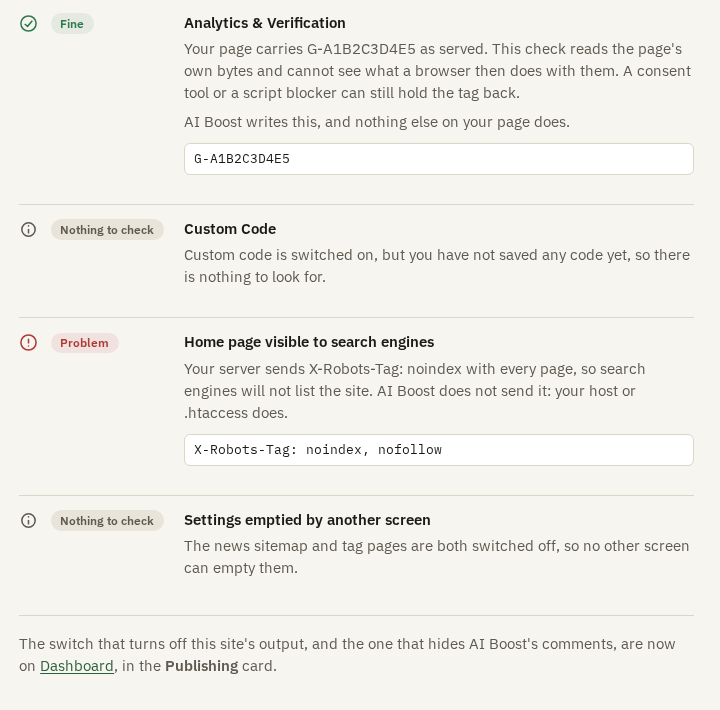
Analytics & Verification looks for your Google Analytics, Tag Manager and Meta Pixel IDs in the home page. The row reads the page as your server sent it. It cannot see what a browser then does, so a consent tool or a script blocker can still hold the tag back after a Fine. It is Worth a look when a Google tag loader is on the page and your ID is not, which is normal when your tags are managed elsewhere. It is a Problem when neither your IDs nor a Google tag loader are there. With Measure visits on and no ID entered, it reads Nothing to check. The verification codes are not checked here.
Custom Code compares what you saved in each of the three boxes with the home page, ignoring differences in spacing. It is a Problem when a snippet did not arrive as you saved it, and the usual cause is a caching or minifying extension that changes it on the way out. The test site has the part switched on with nothing saved, so the row reads Nothing to check.
The two rows that belong to no screen
Home page visible to search engines reads the X-Robots-Tag header your server sends with the home page, and the robots tag in the page. A header that asks search engines to leave the page out is a Problem. AI Boost does not send that header with your home page, so it comes from your host or your .htaccess file. A robots tag in the page that does the same is Worth a look.
The test site's server sends this with its home page:
X-Robots-Tag: noindex, nofollowOn a test site that is what you want. On a live site, ask your host to remove it, or look for the line in .htaccess.
Settings emptied by another screen finds two settings where one cancels the other:
- Tag pages is on for your sitemap, and Keep tag pages out of search on Page SEO takes every tag page out, so no tag page reaches the sitemap.
- Enable Google News Sitemap is on, and the news sitemap's address answers with nothing.
Either is Worth a look. Nothing is broken, but one of the two settings does nothing, and you decide which one you meant. With both the news sitemap and tag pages off, as on the test site, the row reads Nothing to check.
Copy report
Copy report puts the whole reading on your clipboard as plain text, to paste into a message to support or to your developer. It is quicker than describing the screen, and it carries the exact wording of every row. For the test site it reads like this, with every row but one left out:
AI Boost: Site Health
Read at: 28 September 2026 at 18:37:29
Summary: 12 checks, 7 fine, 2 switched off, 0 could not be checked
2 problems, 1 worth a look.

[PROBLEM] Social Sharing
  Your page names no sharing image, so a link to it will be shared without a picture.
  AI Boost writes this, and nothing else on your page does.
If the browser will not copy the report, the screen shows it in a box for you to select and copy by hand.
What the check cannot see
The rows read your home page, one article at most, and a handful of files. A fault that shows only on another page does not reach this screen. For one address, open Pages, Check addresses, and enter it there.