

All docs
Analytics & Verification
Two jobs share this screen, and they have nothing to do with each other beyond both being tags in the page's head. One measures what visitors do. The other shows Google, Bing and Meta that you own the site, and until you have done that, Search Console and Bing Webmaster Tools show you nothing.
Adding these by editing a template works until the template updates. AI Boost writes them into every page from here, and they survive a template change.
Analytics & Verification is under Tools in the sidebar. It has three sub-tabs, Analytics, Meta Pixel and Verification.
Measurement
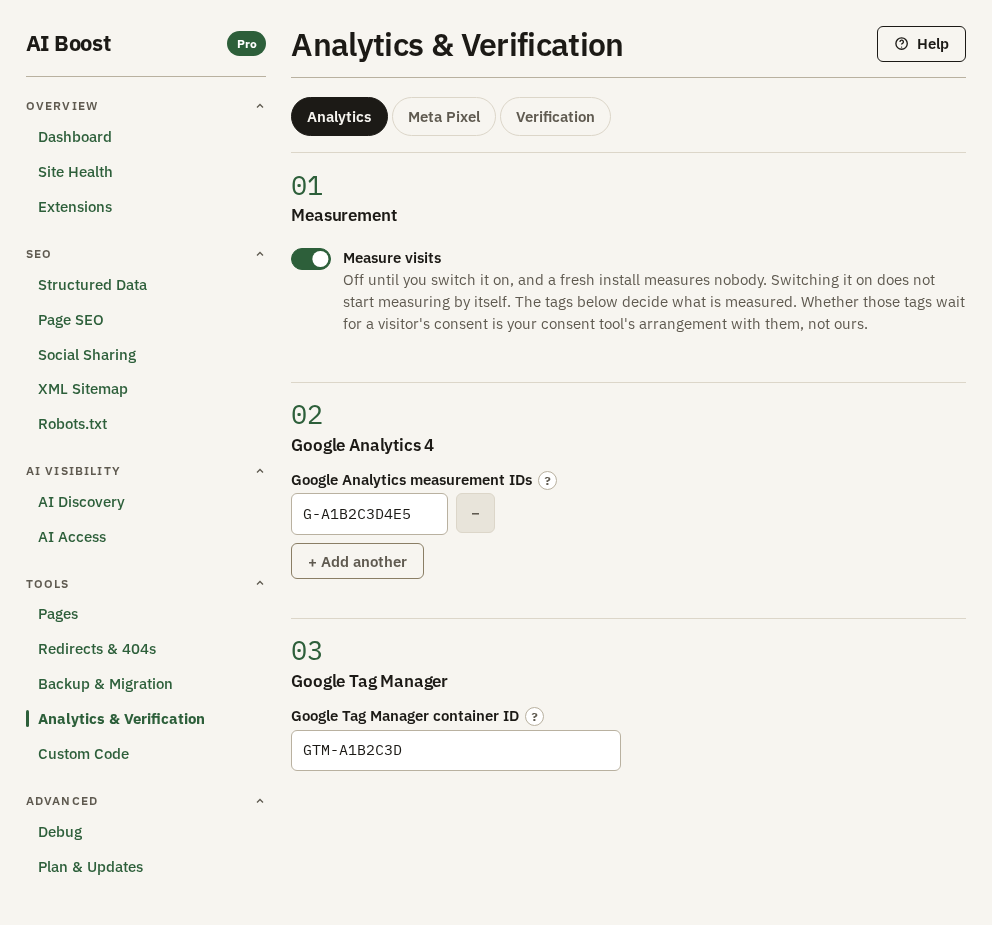
Measure visits turns Meta Pixel, Google Analytics and Google Tag Manager on and off as one. It is off when you install, and switching it on measures nobody by itself. The IDs you enter decide what is measured. Switch it off and AI Boost writes none of those tags into any page, while your IDs stay where you typed them.
Waiting for consent
AI Boost holds a tag back until a visitor consents in one case only. The site runs YOOtheme Pro, the YOOtheme extension is switched on, and you linked that tag to YOOtheme's consent banner. Everywhere else AI Boost writes the tags as they are and does not hold them.
You make the link in YOOtheme, one script for each tag you want held:
- In the YOOtheme Pro customizer, open Settings, then Consent Manager, and set Compliance Type to Opt-in (GDPR) or Opt-out (CCPA).
- Open Settings, then Scripts, and press Add Script.
- Set its Consent Category to Preferences, Statistics or Marketing. YOOtheme always loads a Functional script, so a tag linked under Functional is not held.
- In Consent Service ID, type
aiboost-ga4for Google Analytics 4,aiboost-gtmfor Google Tag Manager oraiboost-pixelfor Meta Pixel. - Save.
From then on AI Boost writes that tag so it does not run on its own, and YOOtheme's banner runs it when the visitor's choice allows its category. While the visitor rejects that category, the tag stays held. A held Tag Manager loses its noscript fallback, since a browser without scripts could never release it.
AI Boost picks no category for you. A tag you did not link is written as before, and Site Health names it with a row such as Google Analytics 4 is not linked to the consent banner while YOOtheme's banner is on.
With any other consent tool, whether the tags wait for it is between that tool and the tags, so check on your own site that they behave as you expect before you rely on it. AI Boost writes what you put in the Head box on Custom Code before these tags, so a consent script there comes before them.
Google Analytics 4
- In Google Analytics, open your property's data stream and copy its Measurement ID, which starts with
G-, such asG-A1B2C3D4E5. - Paste it into Google Analytics measurement IDs.
- Switch on Measure visits.
+ Add another takes a second ID, and every property listed gets the same page view. An agency that reports to a client, or a franchise that reports to head office, needs exactly that, and so does a site in the month two properties overlap. An ID that does not start with G- is left out.
Google Tag Manager
Put your container ID, the one that starts with GTM-, into Google Tag Manager container ID. Whatever you set up inside that container then runs on your site. You get one container, on purpose. A second container would not know about the first, so any tag set up in both would fire twice and double what you count.
AI Boost also writes Tag Manager's noscript fallback just after the opening <body> tag, so you do not paste it anywhere yourself.
If you run Google Analytics through Tag Manager, leave the measurement IDs above empty, or every visit is counted twice.
Meta Pixel
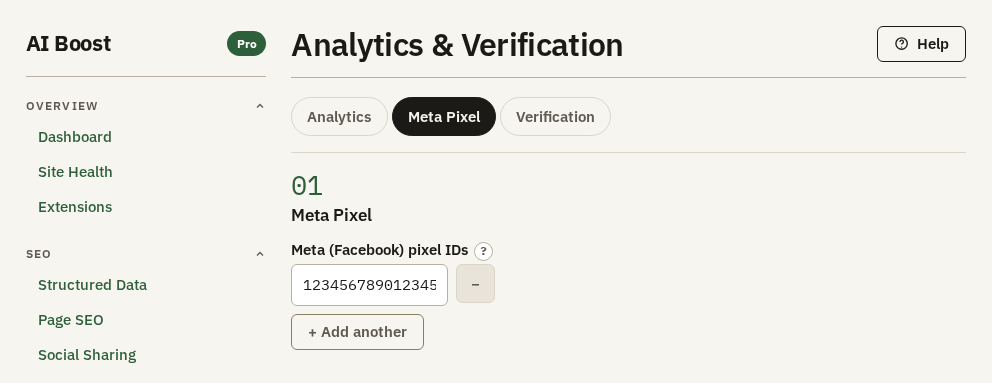
Paste the pixel number from Meta Events Manager into Meta (Facebook) pixel IDs, digits only, with nothing around them. + Add another takes a second pixel. On its own, the pixel sends a page view from every page and nothing more. It is written only while Measure visits on the Analytics sub-tab is on, and the event sections below stay greyed out until it is.
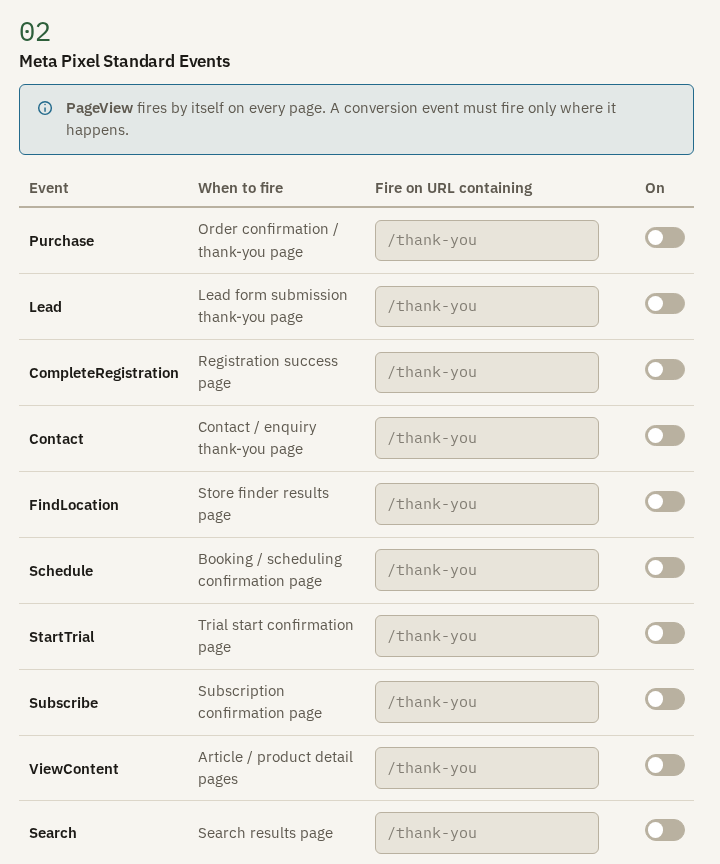
A conversion is a page a visitor reaches after doing something, and Meta Pixel Standard Events fires an event on it. PageView already fires by itself on every page, as the note above the table says. For a conversion, switch on the event in the On column and type part of the address that page has into Fire on URL containing. The When to fire column says which page each event is meant for.
The hotel's booking engine ends on /booking/confirmed, so it switches on Schedule and types /booking/confirmed. Every visit to that page is now a booking in Meta's reports, and its ads are judged by that number. An event switched on with its box left empty fires nowhere.
That is also the risk. An event on the wrong page inflates the number your ads are judged by. Type an address part that only that page has.
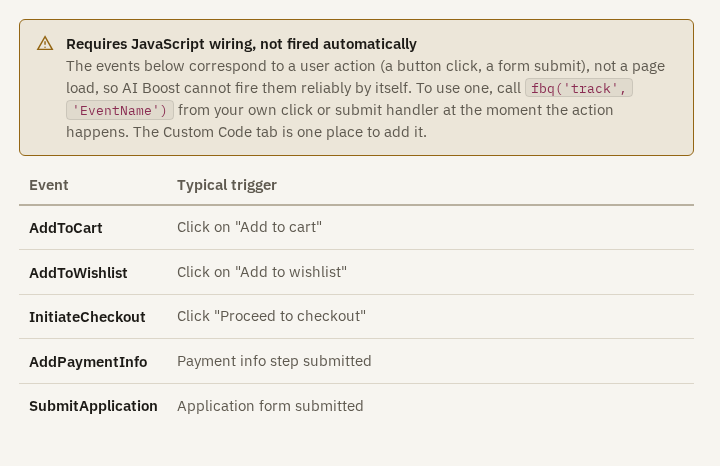
Five events happen on a click or a form submit, not on a page load, such as AddToCart and InitiateCheckout. AI Boost cannot fire those for you. The warning shows the one line of code, fbq('track', 'EventName'), that your own click or submit handler calls at the moment it happens. Custom Code is one place to put that handler.

Meta Pixel Custom Events fires an event you name yourself, on the addresses you give it. + Add Custom Event adds a row with a box for the name, a box for the address part, and Remove. Reach for a standard event first, because Meta already understands those.
A custom event name starts with a letter or a number and may then use letters, numbers, spaces, dots, hyphens and underscores, up to 40 characters. A name that breaks this is ignored without a warning. Leave the address empty and the event fires on every page.
Verification
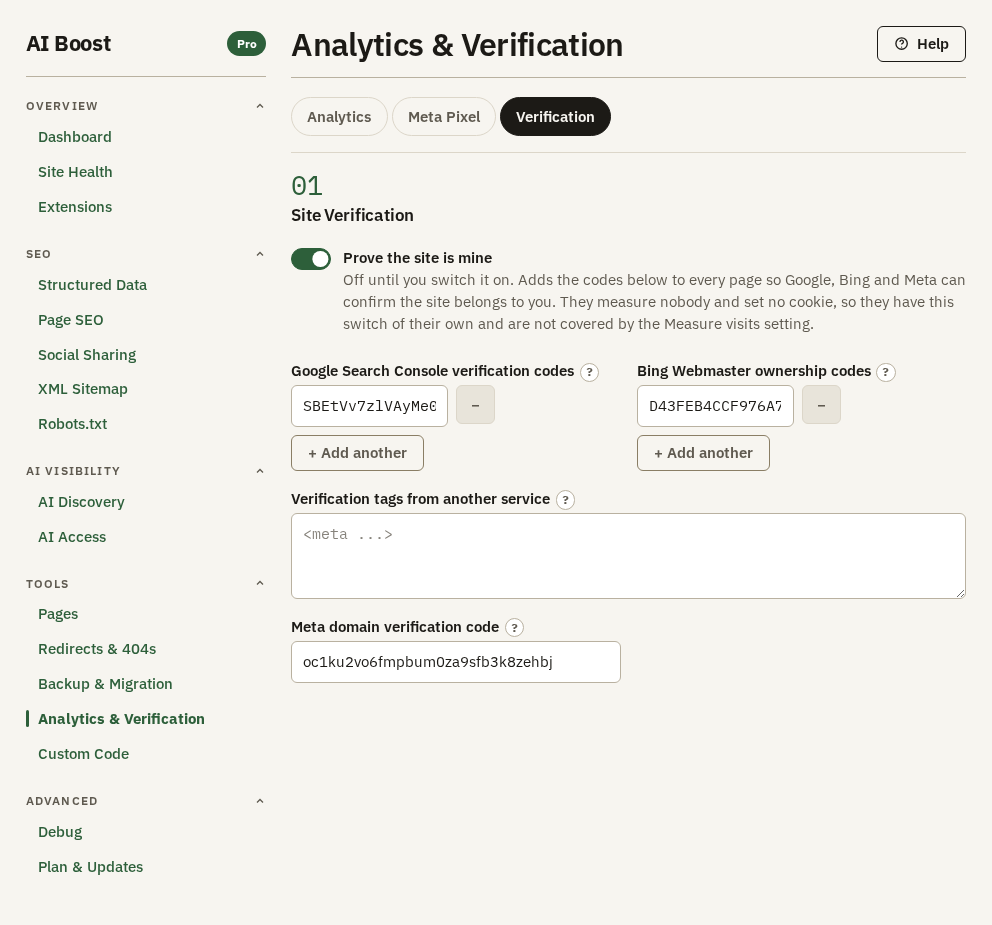
Prove the site is mine is the switch for the four boxes on this sub-tab, and it is off when you install. It is separate from Measure visits on purpose. These codes measure nobody and set no cookie, so stopping measurement never costs you ownership you have already proved.
Each service gives you a whole meta tag. Paste only its content value, never the tag around it.
- In Google Search Console, add your site, choose the HTML tag method, and copy the value between the quotes after
content=. - Paste it into Google Search Console verification codes, and switch on Prove the site is mine.
- Back in Search Console, press Verify.
Bing works the same way. In Bing Webmaster Tools, go to Settings, then Verify ownership, choose the HTML meta tag method, and paste the value into Bing Webmaster ownership codes. Bing issues its codes per account, not per site, so if you and your agency each verified the site from your own account, press + Add another and add a line for each code.
Meta's code, from domain verification in Meta Business Manager, goes into Meta domain verification code, the last box. It takes one value.
A code that is not a plain content value, eight to 128 letters, digits, dots, dashes or underscores, is left out without a word.
For any other service, such as Yandex, Pinterest or Ahrefs, paste the whole tag into Verification tags from another service, the box between Bing and Meta, one tag per line. AI Boost publishes its name and content only. It drops a script, a redirect, an http-equiv tag, and a name another part of the page already owns, such as robots or description.
What AI Boost publishes
For the test site, with the Google, Bing and Meta codes filled in, shortened:
<meta name="google-site-verification" content="SBEtVv7zlVAyMe0ooITdKvUrpe-B6ID1a9HbRsRMNto">
<meta name="msvalidate.01" content="D43FEB4CCF976A7ED88796A63B59901E">
<meta name="facebook-domain-verification" content="oc1ku2vo6fmpbum0za9sfb3k8zehbj">
followed by the Tag Manager script, the Google Analytics script and the Meta Pixel script, in that order, all in the head.
Check it on your site
Open Google Analytics' Realtime report, visit your site in another browser, and watch for the visit. For Tag Manager, use its Preview mode. For the pixel, Meta's Pixel Helper browser extension shows which events fired on a page. Pages, Check addresses, Code shows every tag AI Boost wrote into one page.