

All docs
Redirects & 404s
When a page moves or goes, its old address does not stop being asked for. A link on another site still points at it, a guest has it bookmarked, and a search engine has it in its index. Joomla answers each of those requests with its not-found page, and the visitor leaves. A redirect answers the old address with the new one, and the browser goes straight there.
Redirects & 404s does two jobs. It holds your redirect rules, and it records the addresses visitors asked for and did not get, so you know which rules to write. It is the second screen under Tools in the sidebar, with three sub-tabs.
- Redirect rules holds your rules and the form that adds one.
- Dead addresses lists the addresses that failed.
- Paste a list adds many rules in one go.
The number beside Redirect rules counts your rules, and the one beside Dead addresses counts every address recorded. The screen reads both the first time you open it, and again after you add, switch, delete or paste rules or empty the list. The line under the introduction says when it last read them, and Read again reads them afresh.
The examples on this page come from a test site set up as the Aldwick Lane Hotel.
Switch the rules on
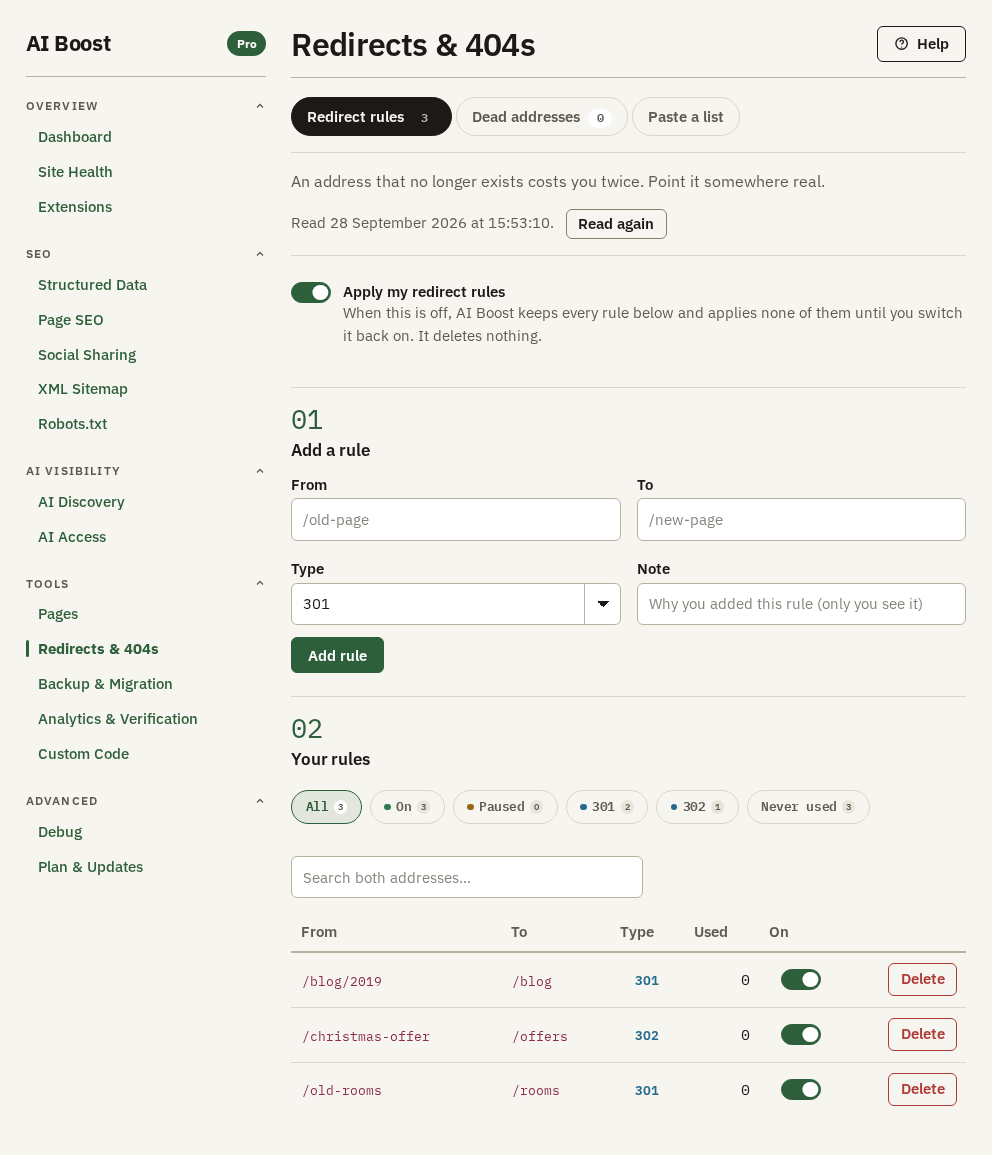
Apply my redirect rules is off when you install. You can add rules while it is off, and none of them acts until you switch it on. Switching it off later pauses every rule at once and deletes none.
Publish nothing at all on the Dashboard leaves your redirects working. To stop them, switch off Apply my redirect rules here.
Add a rule
Fill in the four fields under Add a rule and press Add rule. The rule acts from the next visit.
- From is the old address. Write the part after your domain, starting with a slash, such as
/old-rooms. That one form catches the address over http and https alike. - To is where the visitor goes. A page of your own starts with a slash,
/rooms. A page on another site needs its whole address,https://included. - Type is the code the redirect answers with. Leave it on 301 unless the table below says otherwise.
- Note is for you alone and never reaches the site. It shows under the old address in Your rules, and in a year it is the only record of why the rule exists.
| Type | What it tells a browser | Use it for |
|---|---|---|
| 301 | The page has moved for good | A page renamed, merged into another or replaced. The usual choice |
| 302 | The page has moved for now | A page that will come back, such as a seasonal offer |
| 303 | See another page | Sending a visitor on after they submit a form |
| 307 | Moved for now, repeat the same request there | Like 302, for an address that receives a form |
| 308 | Moved for good, repeat the same request there | Like 301, for an address that receives a form |
The hotel renamed its rooms page, so /old-rooms goes to /rooms with a 301. Its Christmas offer page is unpublished for most of the year, so /christmas-offer goes to /offers with a 302. When December comes round, the hotel publishes the page again and switches that one rule off.
A 301 tells a search engine the old address has been replaced by the new one. A 302 tells it to keep the old one. What a search engine then does with either is its own decision.
How a rule matches
- Matching is exact, capital letters included.
/old-roomsdoes not catch/Old-Rooms, and/old-rooms/, with a slash at the end, is a different address. - A rule catches its address whatever follows a question mark, so
/old-roomsalso catches/old-rooms?ref=newsletter. The visitor lands on the To address exactly as you typed it, and the part after the question mark stays behind. - A star in From stands for anything.
/blog/2019/*catches every address under/blog/2019/, and not/blog/2019itself. Every address it catches goes to the same To. To takes no star. - A rule acts before Joomla works out which page to show. A rule on an address that still has a page sends visitors away from that page.
- A rule that would send an address to itself is skipped.
- Rules act on your public site only. The administrator is never redirected.
Your rules
Your rules lists every rule, newest first. The chips above it, All, On, Paused, 301, 302 and Never used, each show how many rules they hold. Search both addresses looks in From and To together.
Used counts each time a rule sent someone on. Crawlers count too, and so do the checks AI Boost runs from Pages. The switch in the On column pauses one rule and keeps it. Delete asks first, then removes the rule, and the old address fails again.
Nothing on the screen edits a rule. To change one, delete it and add the corrected rule. Do it in that order, because when two rules catch the same address the older one wins, and a correction added beside the old rule never acts. In the list, the older rule is the one lower down.
Nothing stops two rules from sending visitors round in a circle, /a to /b and /b back to /a. Before you add a rule, search for both of its addresses to see whether another rule already names them.
Look at Never used a few months after a site move. A rule nobody has followed in that time is safe to delete.
On a site with more than 500 rules, the list shows the newest 500, and the chips and the search look at those alone. Every rule keeps working.
Rules with a star have a limit of their own, whatever the size of the list. AI Boost tries only the 200 oldest switched-on rules that hold a star. A newer star rule does not act until one of those is paused or deleted.
Dead addresses
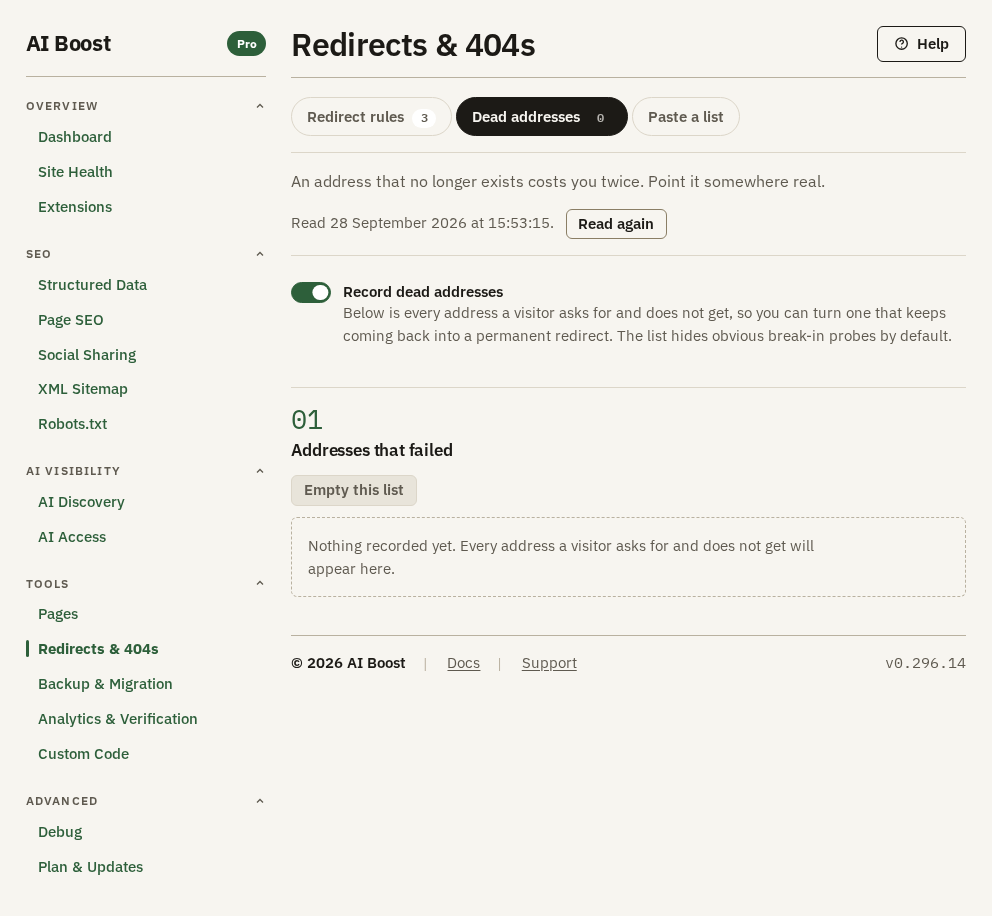
Record dead addresses is on when you install. Each time your public site answers a request with Joomla's not-found page, the address goes on this list. Asked for again, it keeps its one row and its count goes up. Switch it off and nothing new is recorded, and the list keeps what it already holds.
AI Boost leaves out what would only add noise. Campaign tags such as utm_source, gclid and fbclid come off an address before it is recorded, so one address shared in three campaigns is one row. The checks that Site Health and Pages run against your site are never recorded.
| Column | What it shows |
|---|---|
| Address | The address as it was asked for. A probe badge marks one that looks like software hunting for a way in |
| Came from | The page that linked to it, from the latest request that named one. your own link means a page on your own site. A dash means no request named a page |
| Asked by | a person or a robot, judged from the browser's signature on the latest request that sent one. An address no request sent a signature for counts as a robot |
| Used | How many times the address was asked for |
| Last seen | When it was last asked for |
The list opens on the Worth fixing chip. It hides probes, and it hides an address asked for only once unless a page of yours links to it. From your own site holds the addresses your own pages link to. From elsewhere holds every other address that is not a probe, those that arrived with no page named included. Break-in probes holds the probes, and All holds everything. Asked for at least hides addresses asked for fewer times than the number you type, whichever chip is chosen.
An address counts as a probe when its path looks like a hunt for a way in. That covers WordPress's wp- paths, hidden files like .env or .git, any .php file, and files ending in .zip, .sql, .bak, .log or .ini, among others. A part of the path that starts with shell, pma or wordpress counts too, so a real page such as /menu/shellfish or a dead download link can be marked a probe. The .php rule includes Joomla's own index.php. If your site's addresses start with /index.php/, or you are tracing old addresses of that shape, look under Break-in probes too.
The list shows the 200 addresses asked for most often, the most recent first where two are level. A line under the table says so when more are recorded.
From a dead address to a rule
Say the hotel's list shows /garden-jazz, asked for 14 times and marked your own link. A page on the site still links to an article that has moved.
- Fix the link on that page first. A redirect sends every click on it the long way round.
- Press Create rule on the row. Redirect rules opens with
/garden-jazzalready in From. - Type
/park-blog/first-blog-postinto To, keep 301, and press Add rule. Links on other sites now arrive too.
Once the rule acts, the address stops failing, so its count stops rising and Last seen stays where it was. Empty this list asks first, then clears every row and leaves your rules alone. After a site move, empty the list once your rules are in, and whatever comes back is what you missed.
Paste a list
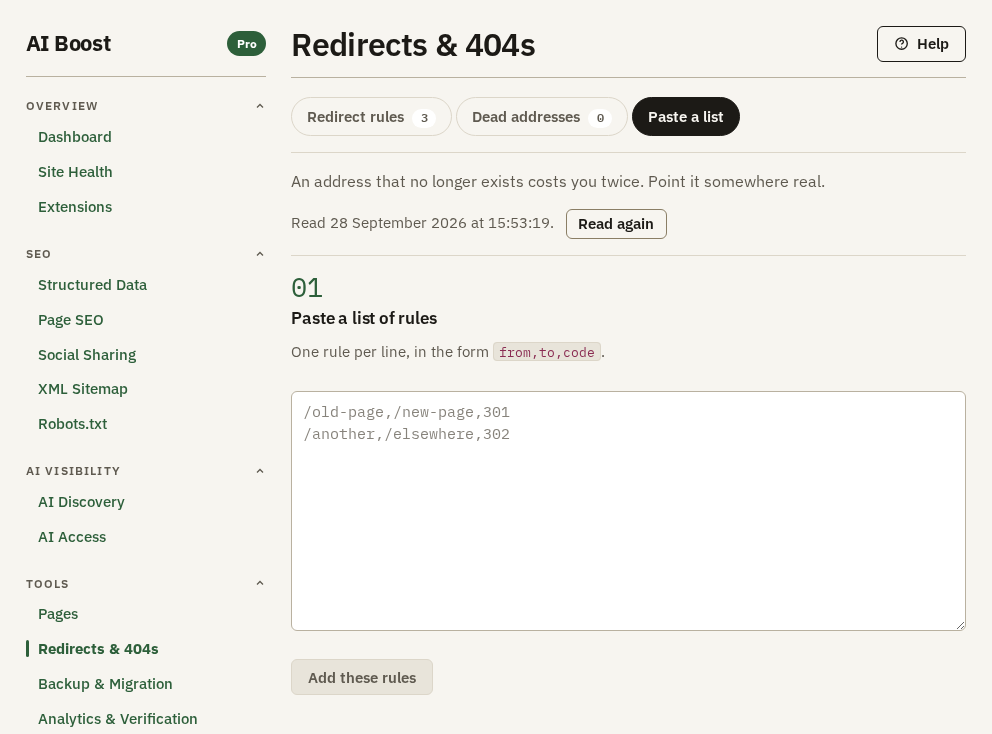
A site move or a rebuild leaves dozens of old addresses at once. Paste a list of rules takes them in one go, one rule per line, in the form from,to,code. Press Add these rules, and a message says how many were added and how many lines were skipped.
The hotel moved its room pages in a rebuild:
# Room pages renamed in the 2026 rebuild
from,to,code
/rooms/single,/rooms/classic-single,301
/rooms/double,/rooms/classic-double
/blog/2019/*,/blog,301- A line that starts with
#is skipped, and so is a blank line. - A header row that starts with
from,orfrom_url,is skipped, so a list saved from a spreadsheet can go in as it is. Quotes around a value, the way a spreadsheet writes them, are read correctly. - A line with no type, like the second rule, becomes a 301. So does a type other than the five in the table above.
- A line missing its old or its new address is skipped and counted.
That list adds three rules and skips nothing, since the comment and the header are not counted. Pasted rules are switched on, carry no note, and match the same way as rules added one at a time.
Nothing checks for a rule you already have. Paste the same list twice and every rule is there twice, with the older copy acting. Search Your rules before you paste a corrected list, and delete what it replaces.
Keeping your rules
Export settings file on Backup & Migration carries every rule, with its type, its note and whether it is on. The Used counts and the dead addresses stay on the site. Uninstalling AI Boost deletes both the rules and the list, so export first, as Uninstalling AI Boost explains.
Check it on your site
Open an old address in a private window. You should land on the new page. The private window matters after you change or delete a 301, because a browser may remember a 301 it has followed and not ask your site again.
To see the code itself, ask for the old address from a terminal:
curl -I https://example.com/old-roomsThe answer carries the rule's type, 301 here, and a Location line naming https://example.com/rooms.
To check many addresses at once, open Pages, go to Check addresses, and paste the old addresses in full, one per line, into A list of addresses. Press Check these addresses. Each address a rule catches reads Sends visitors elsewhere when the page it lands on opens. It reads the same when the rule sends visitors to another site, because AI Boost does not open pages on other sites. It reads Broken when the page on your site answers with an error, and No answer when that page does not answer at all. Where it goes shows every step with its code. Two rules sending visitors round in a circle read Broken. Each check adds one to the rule's Used count.